cent4cent keeps your books for you, so you always know what you earned, spent and saved,
where you’re overspending, and whether you’re getting ahead. It takes a few minutes a month,
and every account is checked against your bank.
You can’t plan ahead until you know what you earn, spend and save.
Usually one of two things gets in the way.
If you’ve just started earning
You check the balance and hope it’s enough.
Real pay is coming in, and you have no clear picture of where it goes. The balance looks
fine until rent, the card and the insurance all come out in the same week. It can’t tell
you whether you’re getting ahead, and the habits you set now tend to stick.
If you’ve tracked it for years
Your money has outgrown the app, or the spreadsheet.
A second currency, a joint account, holdings without a ticker, money a friend owes you.
The app files them wrong or can’t hold them at all. The spreadsheet can, but only you can
read it, and you’re never quite sure it’s right.
cent4cent gives you those three numbers every month, checked against your bank to the cent.
See how a month works
Ten minutes a month keeps you on top of everything.
It does the sorting and the maths, and only asks you what it can’t work out for itself.
A minute
Bring the month in
From any bank, card or broker, in any currency, and as many past months as you like. cent4cent sorts every transaction for you, from its description and everything around it.
A few taps
Answer a question or two
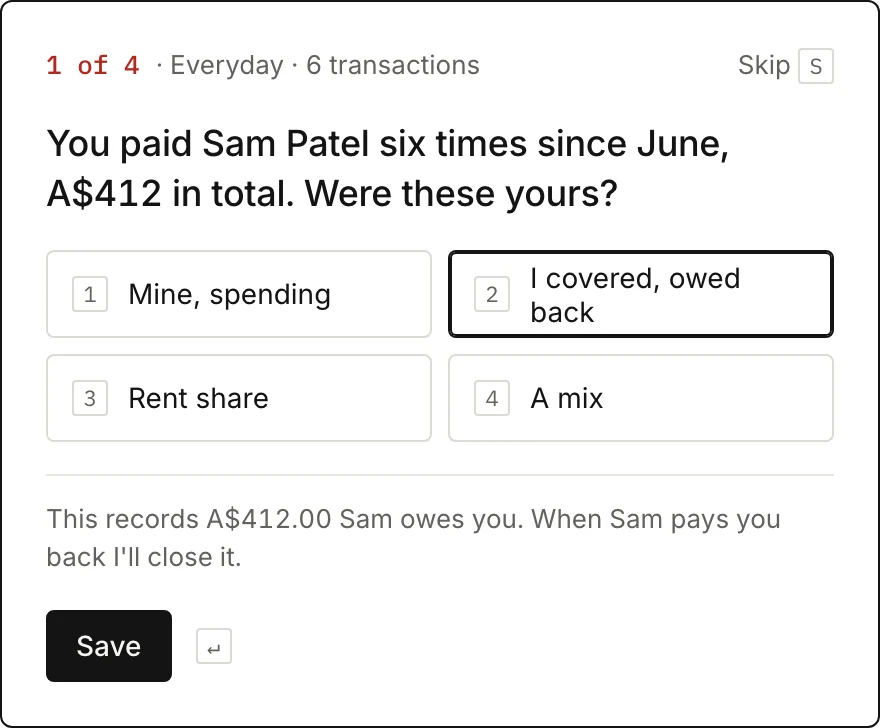
Only about what no bank record can say: whose dinner that was, whether a booking is for a trip later, or whether a work expense needs paying back to you. Every answer is remembered.
Every month
Know exactly where you stand
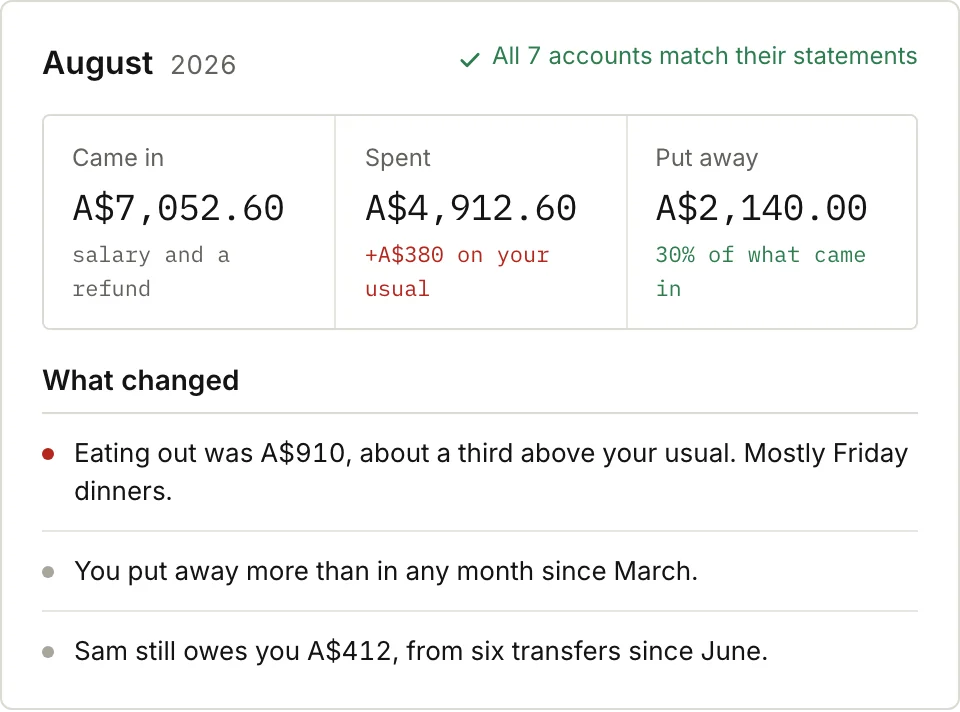
What you earned, spent and saved, to the cent
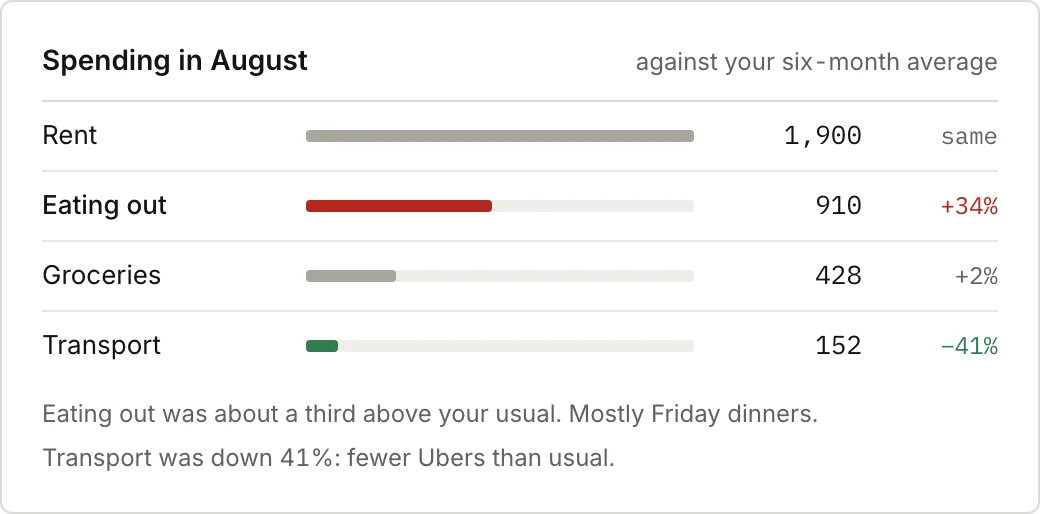
Where you’re spending more than usual, while there’s still time to change it
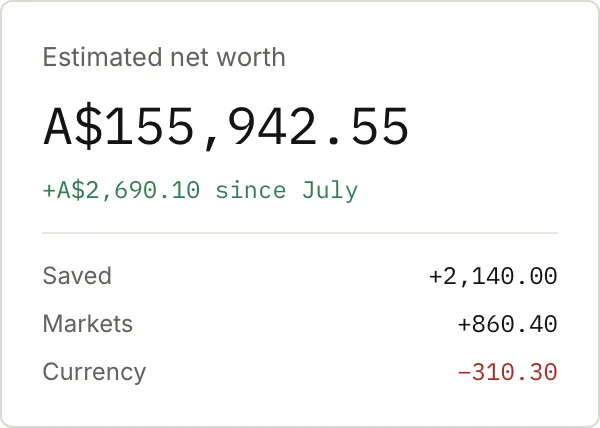
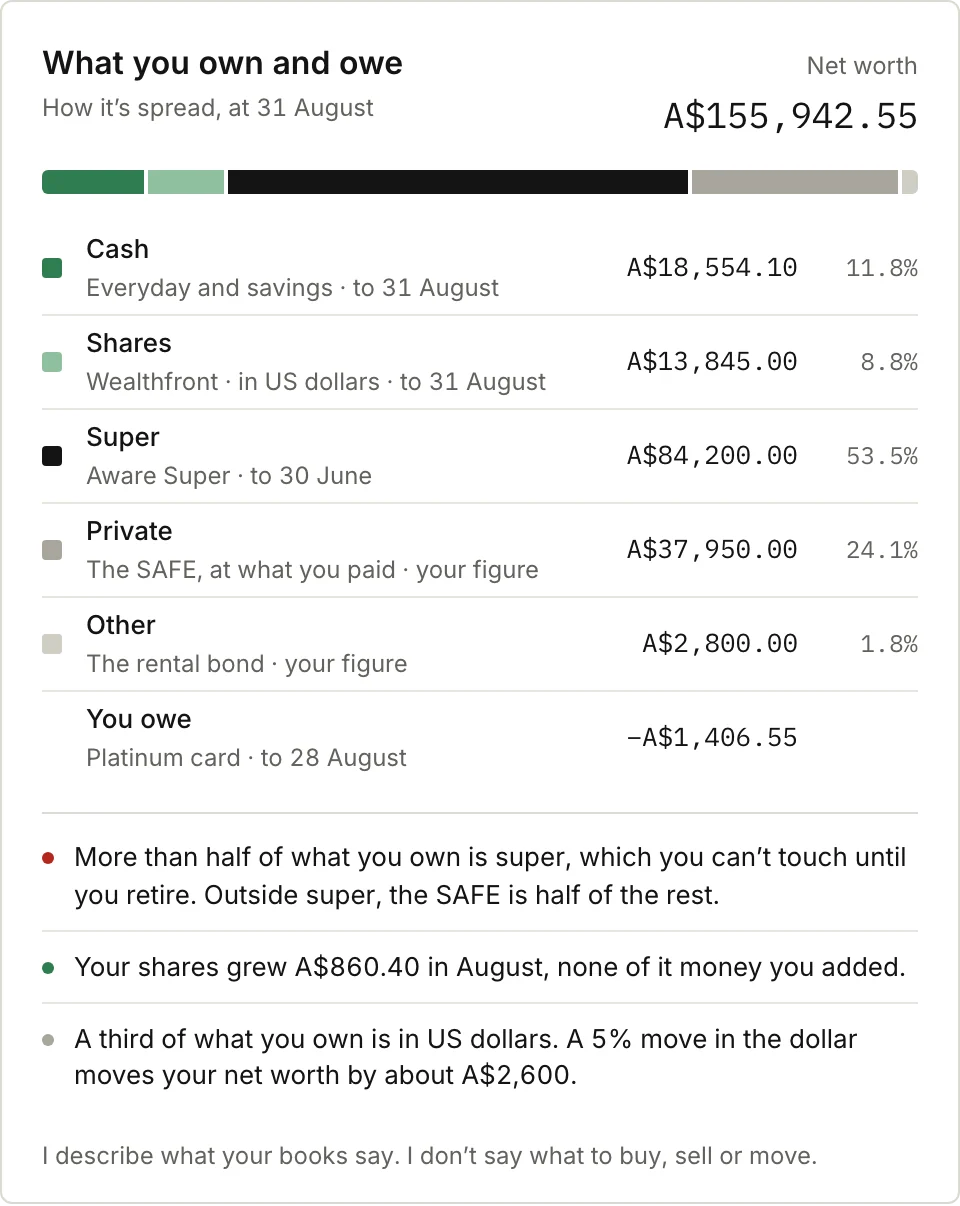
Everything you own in one picture, and what’s growing
Everything you need to feel in control of your money.
Here’s August for someone in our sample book: a salary, savings, shares held in US dollars,
a stake in a friend’s startup, and a friend who owes them A$412. Every name and figure is
made up.
Clarity
Know what you earned, spent and saved, to the cent.
Three numbers at the top of every month, from accounts checked against your bank, and a few plain sentences about what changed. No charts to decode and no totals you have to second-guess.
Control
Catch overspending before it becomes a problem.
Each category is set against your usual month, so the one that crept up stands out while there’s still time to change it. In this August it was eating out, about a third over.
Wealth
See everything you own, and what it’s doing for you.
Cash, shares, super, property, a stake in a startup: one picture of all of it. See how it’s spread, where you’re concentrated and what’s growing, so you know whether you’re on track to feel secure, buy a home or retire early.
Goals
Know how far you are from the life you want.
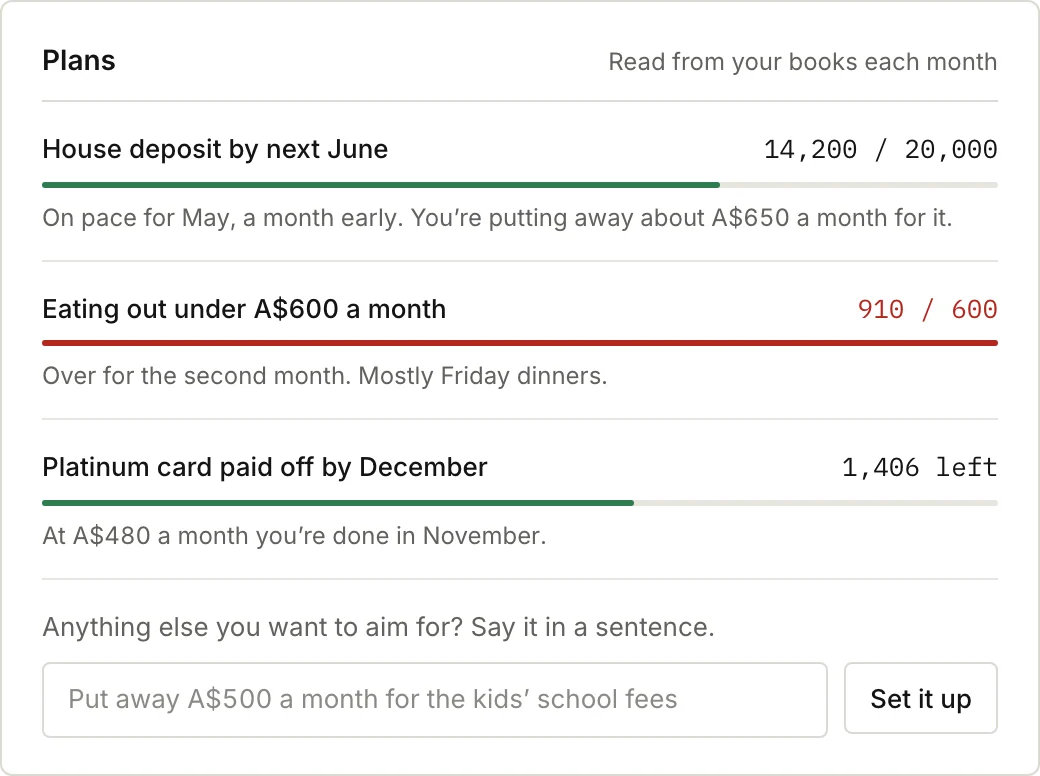
Say a goal in a sentence, like a house deposit, an emergency fund or retiring early, and see every month whether you’re on pace. In the sample, the deposit is on track to arrive a month early.
Ease
Minutes a month, not hours.
It sorts every transaction for you, reading the description and what surrounds it. When a category gets too broad it suggests a sharper one, like climbing split out of fitness, and applies it back through your history. When something’s unclear, it asks one quick question and remembers the answer.
Not another budgeting app.
Budgeting apps make you do the work and squeeze your life into their categories. cent4cent
keeps proper books underneath and does the bookkeeping for you, so it fits the way your
money actually works and simply tells you where you stand.
Most budgeting appscent4cent
The workMost budgeting apps You build the budget, set up the categories and fix what it gets wrong, every month. cent4cent It sorts every transaction for you. You answer a question or two.
CategoriesMost budgeting apps A fixed list you set up and maintain by hand. cent4cent Categories that sharpen as it learns, applied back through your history.
Your lifeMost budgeting apps One currency, and anything unusual gets forced to fit. cent4cent Fits your money as it is: any account, any currency, any kind of asset.
When it’s unsureMost budgeting apps Guesses, and leaves you to find the mistakes. cent4cent Asks you once, in plain words, then remembers.
The bottom lineMost budgeting apps A total you’re never quite sure is right. cent4cent Every account checked against your bank, to the cent.
14 days free, no card needed. Add one only if you decide to stay.
Why it isn’t free. The subscription is the whole business. There are no ads, no
data sales and no commissions for recommending products.
Questions to ask before you start.
Does AI read my transactions?
Yes. Your transactions are read by an AI model, a batch at a time, along with your list of accounts and the rules you’ve given it, under commercial terms that don’t allow it to train on them. When it isn’t sure about something it asks you rather than guessing, and every account is checked against your bank before the month counts as done.
I’ve never tracked my money. Is this for me?
Yes. There’s nothing to set up first: no categories to build and no budget to keep. Your first month shows what you earn, spend and save, and where it all goes.
I already track everything. What would change?
Mostly the work. You stop typing and categorising, and answer the few questions only you can. The books also hold what most apps can’t: a second currency, money owed to you, holdings without a ticker, a joint account beside separate ones. And every account is checked against your bank each month, so you know the total is right.
How does it categorise my transactions?
From the description on each transaction and the context around it: the merchant, the amount, the day, what else happened around it, and what you’ve told it before. When a category gets too broad, it suggests a sharper one, like climbing split out of fitness, and applies the change back through your history so past months stay comparable.
What if it gets something wrong?
Change it, and it remembers. Every correction becomes a rule in plain words that you can read, edit or pause, and a rule that turns out wrong twice in a month goes back to being a question. Because every account is checked against your bank’s own records, a missing or doubled transaction shows up as a difference instead of hiding in a total.
Do I need to connect my bank?
No. You bring each month in from your bank, card or broker, in the formats they already give you, and cent4cent sorts it from there. Nothing is linked to your bank account.
How is my data kept safe?
Everything is encrypted in transit and at rest, and the notes you write are encrypted again with a key of their own. Nobody at cent4cent reads your books without your permission, and your data is never sold or shared. The security page has the detail.
Can I take my books with me?
Any time. Export the whole book as CSV, JSON or Beancount text, a plain format other tools can read, and delete it whenever you like.
Can I bring in past months?
Yes, as many as you like, including during the trial. Your history is built back month by month: what you earned, spent and saved, and how your net worth got to where it is.
What happens after the 14 days?
No card is needed for the trial. To keep bringing in new months, add one and choose A$10 a month or A$100 a year. If you don’t, nothing is charged, and your books stay yours to open and export. Yearly plans are refunded in full if you cancel within 30 days.
Does it give financial advice?
No. It shows you your own money and projects from your own numbers. It never recommends a product, fund, loan or account.
Know where you stand, starting this month.
14 days free, no card needed. Then A$10 a month or A$100 a year, and your books are yours to export at any point.